
InputBox
A text or password input dialog for batch files
- Version
- 1.10.0.17
- System
- Windows, 32-bit (runs on 64-bit too)
- Source
- github.com/pedromagician/CMD_InputBox
Download InputBox145 kB
No installation: unzip anywhere (ideally into a folder on your PATH) and run it from the command line or a batch file.
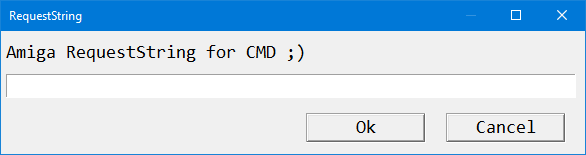
InputBox is a small input dialog for batch files and PowerShell. It shows a message and a field, and prints whatever the user types to the output. No need to build a whole window in Visual Studio for that.
Features
- Title, message (multiple lines with
\n) and pre-filled text. - Password mode: characters are shown as
*. - Unicode in text via
\u{XXXX}. - Custom colors, font and size, window width and number of message lines.
- Monitor selection and precise placement (center, edges, at the pointer or coordinates), topmost window.
- Custom application icon and optional blocking of the parent process until the dialog closes.
Usage
InputBox.exe -t "Login" -m "Enter your username:"
InputBox.exe -t "Password" -m "Enter password:" -password
InputBox.exe -t "Color Test" -m "Nice colors!" -background #202020 -pen #00FFAA
Store the text in a variable:
@set mytmp=null
@for /f "tokens=*" %%i in ('InputBox.exe -title Title -message "Message..." -default text') do @set mytmp=%%i
@echo %mytmp%
Options
| Switch | Description |
|---|---|
-title, -t | Window title. |
-message, -m | Message text, supports \n and \u{XXXX}. |
-default, -d | Pre-filled input text. |
-password, -pass | Masks typed characters with *. |
-font, -f | Font name. |
-fontsize, -fs | Font size in points. |
-lines, -l | Number of lines for the message. |
-width, -w | Window width in pixels. |
-pen, -p | Text color (#RRGGBB), default #FFFFFF. |
-background, -b | Background color, default #000000. |
-brush, -br | Fill color, default #000000. |
-border, -bo | Frame color, default #000000. |
-monitor, -mon | Monitor: Primary, Mouse, MousePointer or an index (0, 1, 2 …). |
-position, -pos | Placement: center, top, bottom, left, right, pointer, xy. |
-x, -y | Offset in pixels. |
-topmost | Keeps the dialog above other windows. |
-iconapp | Application icon (ICO or BMP). |
-block | The parent process waits until the dialog closes. |
-help, -h, -? | Help. |