
MessageBoxEx
A message with custom colors, font, image and timers
- Version
- 1.10.0.10
- System
- Windows, 32-bit (runs on 64-bit too)
- Source
- github.com/pedromagician/CMD_MessageBoxEx
Download MessageBoxEx143 kB
No installation: unzip anywhere (ideally into a folder on your PATH) and run it from the command line or a batch file.
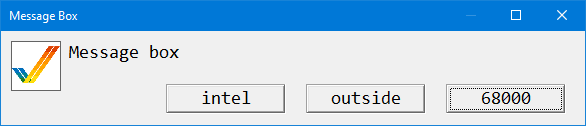
MessageBoxEx is the big brother of MessageBox: a message window where almost everything can be set. Colors, font, image, number and labels of buttons, position, plus timers. The window can close by itself after a time or when a certain file appears on disk, so it also works as a “please wait” window during a long script.
Features
- Title (or no title bar at all), message with
\nand Unicode via\u{XXXX}, font, size, width and number of lines. - Text, background and fill colors.
- A BMP image in the window (with size and border) and a custom application icon.
- 0 to 3 buttons with custom labels, extra width and a default button.
- Monitor selection, placement, topmost window.
- Timers: minimum display time, automatic close after a time or once a file appears (and deleting it).
- Windows MessageBox style return codes, quiet mode and blocking the parent process.
Usage
MessageBoxEx.exe -t "Hello" -m "This is a message"
MessageBoxEx.exe -m "Line 1\nLine 2\nLine 3" -l 3
MessageBoxEx.exe -m "Operation completed \u{1F44D}"
MessageBoxEx.exe -t "Warning" -m "Be careful!" -p FF0000 -b 000000 -i warning.bmp
A “working” window that disappears when the script creates done.flag:
start "" MessageBoxEx.exe -m "Working..." -button 0 -file done.flag -deleteFile
rem ... long work ...
echo.>done.flag
Options
| Switch | Description |
|---|---|
-title, -t | Window title. |
-noTitle, -nt | No title bar. |
-message, -m | Message text, supports \n and \u{XXXX}. |
-font, -f | Message font. |
-fontsize, -fs | Font size in points. |
-lines, -l | Number of lines for the message (window height). |
-width, -w | Window width in pixels. |
-pen, -p | Text color (#RRGGBB or RRGGBB), default white. |
-background, -b | Background color, default black. |
-brush, -br | Fill color behind the text, default black. |
-icon, -i | BMP image in the window. |
-iconsize | Image size in pixels. |
-iconborder | Border around the image. |
-iconapp | Application icon (ICO or BMP) in the title bar and taskbar. |
-button | Number of buttons: 0–3. |
-widthbuttons | Extra width for each button. |
-center | Centers the button text. |
-b1, -b2, -b3 | Button labels. |
-default, -d | Default button (Enter): 1–3. |
-monitor, -mon | Monitor: Primary, Mouse, MousePointer or an index (0, 1, 2 …). |
-position, -pos | Placement: Center, Top, Bottom, Left, Right, Pointer, xy. |
-x, -y | Offset in pixels. |
-topmost | Keeps the window above other windows. |
-block | The parent process waits until the window closes. |
-windowsReturnCode, -wrc | Windows MessageBox style exit code of the pressed button. |
-quiet | Does not print the result to the console. |
-minimumDisplayTime, -mdt | The window stays visible for at least the given milliseconds. |
-timeToCompletion, -ttc | The window closes by itself after the given milliseconds. |
-fileRequiredForCompletion, -frfc, -file | The window closes once the given file appears on disk. |
-deleteFileRequiredForCompletion, -dfrfc, -deleteFile | Deletes that file after the window closes. |
-help, -h, -? | Help. |